One Package Security Policy for Developer Machines and Pull Requests
On one machine, package security is a solved problem. Install PMG, and it blocks malicious packages before they install. Add a dependency cooldown to its configuration file, and new versions wait a few days before that machine can pick them up. PMG is open source, and none of this needs an account.
A security engineer has a different job. You answer for hundreds of developer machines and the CI runners that build your services. Coding agents run npm install on those machines, and each repository takes pull requests. You need one set of rules to hold on all of them and a change to reach them within minutes. You also need an answer when someone asks why an install failed. SafeDep Cloud Policy is that set of rules. You write it once in SafeDep Cloud, and PMG on each machine and the pull request check on each repository apply it. Cloud Policy is part of the SafeDep Cloud Team and Enterprise plans.
Rules that live on each machine
Teams that run PMG across a fleet ship its configuration through MDM. A new cooldown or one more blocked package means a new MDM package and a rollout, and some machines keep the old rules for days. The pull request check keeps its own settings, so the rules on a developer machine and the gate on a repository drift apart. After an incident, you cannot tell which rules each machine had on which day.
One policy for machines, repositories and agents
Each tenant has one policy in SafeDep Cloud. The policy base sets the values for all endpoints and projects, such as a seven-day cooldown and the lowest vulnerability severity that fails a pull request. Policy overrides change some of those values for a group. Package rules block a package, or trust one after a review.
PMG reads the policy on developer machines and CI runners, including the installs that coding agents run through PMG. The pull request check reads the same policy for each repository that the SafeDep GitHub App or Bitbucket app scans. The Policy page in SafeDep Cloud shows the values in force and the layer that set each one. In the example below, the cooldown is seven days for most of the company and longer for the payment services.
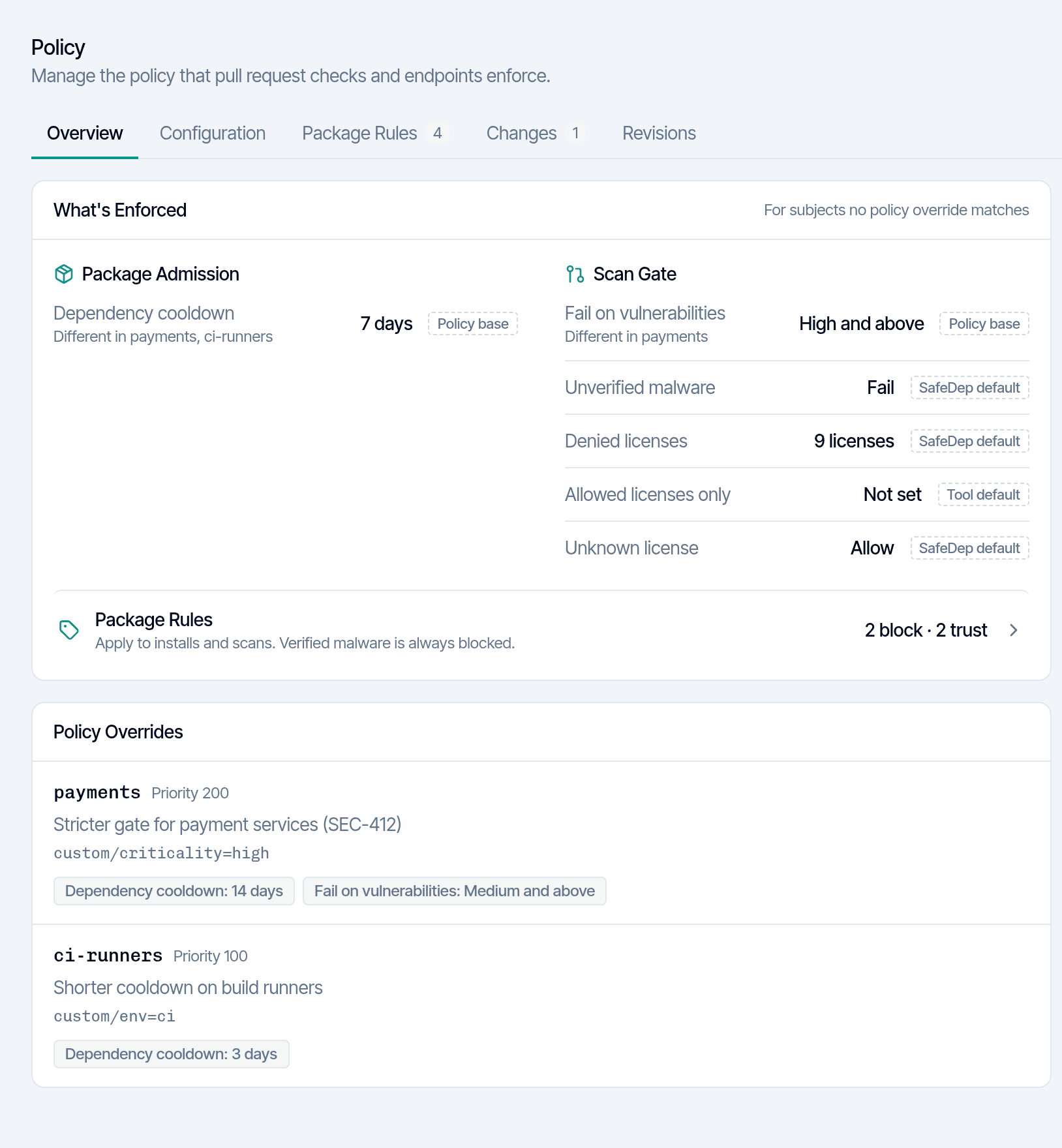
Blocking a package across the company
Say a malicious version of an npm package goes live and your team confirms it within the hour. You select Block Package in SafeDep Cloud, or run one command:
$ safedep policy rule create --block pkg:npm/color-string-utils --vers '>=1.2.0' --reason "IR-2291 credential stealer" --ticket IR-2291The block publishes at once. Pull request checks apply it from their next run, and PMG on each machine picks it up on its next policy fetch, at most five minutes later. PMG shows the developer your reason and a rule id to send you.
PMG checks the block when a package downloads through its proxy. If the npm or pip cache on a machine already holds the file, the install can still go through. After an urgent block, ask developers to run pmg cloud sync and then clear the cache.
Unblocking a false positive without turning protection off
When a verdict is wrong for one team and a release waits on it, the usual workaround is to switch a check off and hope someone switches it back. A trust entry waives one check for one package instead. It needs a reason and expires within 90 days. A trust entry never waives verified malware, and a block on the same package wins over it.
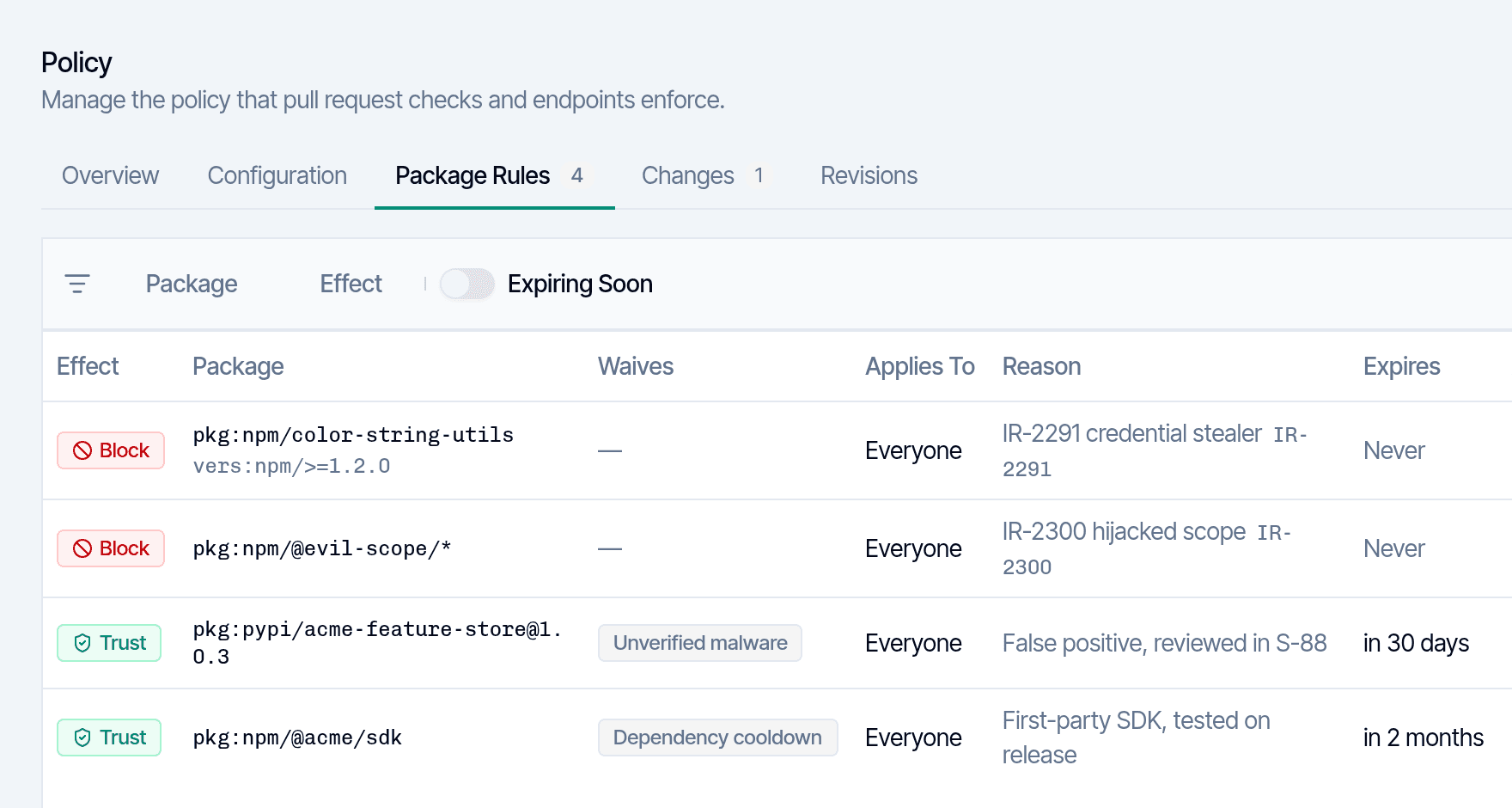
The Package Rules tab lists each block and trust entry with its author, its reason and its expiry, and a filter shows the trust entries close to their expiry date.
Stricter rules for the teams that need them
The payments team may want pull requests to fail on medium severity vulnerabilities and new versions to wait two weeks, while the rest of the company keeps the default. You give their projects and machines a label, such as custom/criticality=high, from the Endpoints & Projects page or the CLI:
$ safedep project label set acme/payments-api acme/billing-service --label custom/criticality=highThen you write one policy override that selects the label and sets only the values that differ. A new payments service gets the stricter rules once someone adds the label, with no change to the policy. The Endpoints & Projects page shows the labels of each project and the overrides that apply to it.
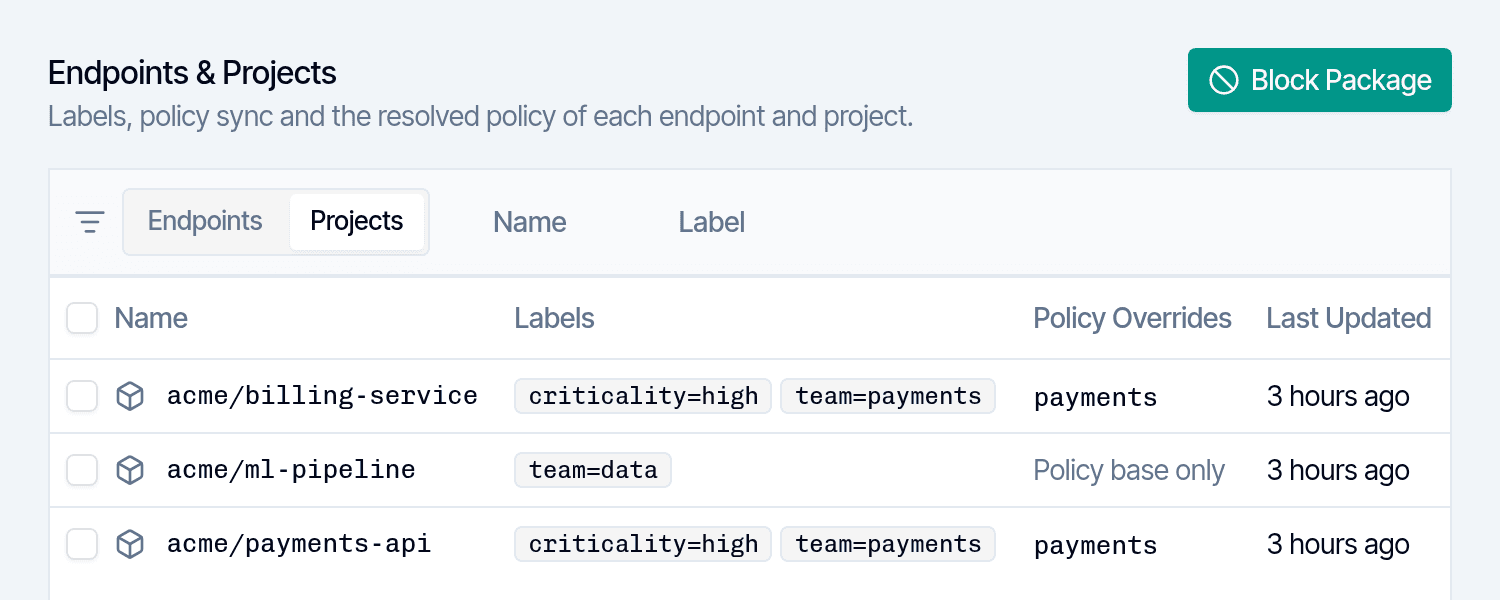
Reviewing and undoing changes
Each settings change starts as a draft. The preview lists each field that changes and marks it as a change that tightens or loosens the policy. It also counts the endpoints and projects the change reaches. A change that loosens the policy asks for confirmation, and SafeDep Cloud emails the Owners and Admins about it.
Each publish creates a numbered revision. To undo a change, you restore an older revision as a new change, and the history keeps both. The Decisions page lists what PMG and the pull request checks decided and the rule or setting behind each decision, and the Audit Log records who changed what. Owners and Admins change the policy, and the ReadOnly role and above can read it.
Get started
You need a SafeDep Cloud Team or Enterprise plan, and the Owner or Admin role in the tenant.
-
Publish a first policy. In SafeDep Cloud(opens in new tab), open Settings › Cloud Policy › Policy, go to the Configuration tab, and set the dependency cooldown and the severity that fails a pull request in the policy base. Select Preview & Publish. From a terminal,
safedep policy editdoes the same with thesafedepCLI v0.11.0 or later. -
Turn on the cloud policy in PMG. PMG v0.35.0 or later applies it. On each machine, connect PMG to the tenant with an API key from Settings › API Keys, then turn the policy on:
Terminal $ pmg config set cloud.enabled true $ pmg cloud login $ pmg config set cloud.policy true $ pmg cloud syncpmg setup doctorshows the tenant and the policy revision that PMG applied. -
Check pull requests. Repositories that the SafeDep GitHub App or Bitbucket app scans apply the policy from their next pull request check.
The Cloud Policy quickstart(opens in new tab) walks through the same steps, and the Cloud Policy docs(opens in new tab) cover each task in the console and the CLI. vet does not read Cloud Policy yet, and the pull request check does not apply the dependency cooldown. The limits page(opens in new tab) lists the other gaps.
Later posts in this series cover incident blocks, the cooldown across a fleet, targeting groups with labels, and explaining and rolling back decisions.
- cloud-policy
- pmg
- supply-chain
- security