



Gryph: Audit Trail for AI Coding Agents
On this page
TL;DR
Gryph is a local-first audit trail for AI coding agents. It hooks into Claude Code, Cursor, Gemini CLI, and other agents to log every file read, file write, MCP tool calls, and command execution to a local SQLite database. No cloud telemetry, no data leaving your machine. Query, filter, and replay agent sessions from the terminal.
brew install safedep/tap/gryphgryph installThe moment you realize you have no visibility
While working with Claude Code, I noticed that it read .env file followed by executing pythong3 -c ....
Then I realised that I was working on a public GitHub issue that is susceptible to prompt
injections. Manual analysis revealed that Claude was trying to figure out if it needs to set
environmen variables before calling gh CLI to pull data from GitHub. It then cooked up a Python
one-liner to extract the required information from the API response JSON.
That moment stuck with me. Not because anything went wrong. The agent was doing its job, gathering
context, transforming data from gh api to produce better output. But I had no record of it. No log
of which files were read, no trail of what commands ran, no way to answer the question “what exactly
did my agent do in that session?” after the fact. Sure, I can investigate Claude Code sessions but
that does not scale over time or across team members.
We log SSH sessions. We audit database access. We record who deploys what to production and when. AI coding agents operate with comparable access to sensitive systems, entire codebases, environment variables, shell access, and yet they produce no persistent audit trail.
The gap
This is not a hypothetical concern. Developers grant AI agents access to entire project directories, including configuration files, secrets, and infrastructure definitions. Agents read files to build context, execute shell commands to test code, and write changes across multiple files in a single session.
When something goes wrong, there is no audit capability. A broken build after an agent session
means manually diffing files to reconstruct what changed. A security review asking “did any AI tool
access our credentials?” has no data source to query. An unexpected npm install or curl in the
agent’s output scrolls past and disappears.
Production systems already solved this. Application logs, audit trails, access records. AI coding agents are the gap in that chain.
Gryph
Gryph fills that gap. It installs lightweight hooks into agent configurations and logs every action to a local SQLite database. File reads, file writes, command executions, tool invocations, session boundaries: all captured, all queryable.
The design is deliberately local-first. No cloud service, no telemetry, no data leaving the
developer’s machine. Sensitive file access (.env, *.pem, .ssh/, .aws/) is automatically
detected and flagged. Secrets in captured content are redacted before storage.
Gryph supports Claude Code, Cursor, Gemini CLI, OpenCode, Windsurf, and Pi Agent. It uses each agent’s native hook system, so there is no custom runtime or wrapper process.
Getting started
Install gryph and set up hooks for your agent. The entire process takes under a minute.
Install gryph:
brew install safedep/tap/gryphInstall hooks for Claude Code:
gryph install --agent claude-codeThe install command produce the following output indicating successful hook installation:
[ok] Claude Code 2.1.69 /Users/dev/.claude
Installing hooks...
Installation complete.
Database /Users/dev/Library/Application Support/gryph/audit.db Config /Users/dev/Library/Application Support/gryph/config.yaml
Run 'gryph status' to verify.Run 'gryph logs -f' to watch activity.That’s it. Gryph is now recording Claude Code activities. Use your agent normally: write code, debug, refactor. Every
action flows through the hooks into the local database. Run gryph install without explicit agent
flags to set up hooks for all supported agents.
View recent activity:
gryph logs2026-03-05 13:45:09 b291330f claude-code a87aef84 tool ToolSearch select:EnterPlanMode2026-03-05 13:45:09 ebf4335d claude-code a87aef84 tool ToolSearch select:EnterPlanMode2026-03-05 13:45:58 0c8d3cb8 claude-code a87aef84 tool ToolSearch select:ExitPlanMode2026-03-05 13:45:58 f22d2443 claude-code a87aef84 tool ToolSearch select:ExitPlanMode2026-03-05 13:46:01 91b12749 claude-code a87aef84 tool ExitPlanMode2026-03-05 13:46:08 667da419 claude-code a87aef84 notification2026-03-05 13:46:08 b82f8fef claude-code a87aef84 tool ExitPlanModeQuery specific events:
The real power is in filtering. Find every file your agent read matching a pattern, or every command it executed in a time window. Run the query below to find out everytime Claude Code modified its own agent instructions.
gryph query --action file_write --file '**/.claude/agents/**'2026-03-05 13:17:49 e169a677 claude-code 052f1858 write my-project/.claude/agents/grunt... +1 -12026-03-05 13:17:49 bc3c273a claude-code 052f1858 write my-project/.claude/agents/grunt... +1 -12026-03-05 13:17:57 329115de claude-code 052f1858 write my-project/.claude/agents/grunt... +12026-03-05 13:17:57 b53cd264 claude-code 052f1858 write my-project/.claude/agents/grunt... +12026-03-05 13:17:59 b10368bf claude-code 052f1858 write my-project/.claude/agents/grunt... +32026-03-05 13:17:59 97a2c6be claude-code 052f1858 write my-project/.claude/agents/grunt... +32026-03-05 13:18:07 c0ccf6cd claude-code 052f1858 write my-project/.claude/agents/corta... +2 -12026-03-05 13:18:07 ef7434e4 claude-code 052f1858 write my-project/.claude/agents/corta... +2 -12026-03-05 13:18:09 4cae6942 claude-code 052f1858 write my-project/.claude/agents/corta... +1 -12026-03-05 13:18:09 7bc68ef3 claude-code 052f1858 write my-project/.claude/agents/corta... +1 -12026-03-05 13:18:10 790469aa claude-code 052f1858 write my-project/.claude/agents/corta... +1 -12026-03-05 13:18:10 e333439c claude-code 052f1858 write my-project/.claude/agents/corta... +1 -12026-03-05 13:18:11 7708c823 claude-code 052f1858 write my-project/.claude/agents/corta... +1 -12026-03-05 13:18:11 c6bb124c claude-code 052f1858 write my-project/.claude/agents/corta... +1 -1Sensitive file detection
Gryph automatically detects when agents access sensitive paths and marks those events. This is not a
manual configuration step. Patterns like .env, *.pem, .ssh/**, and .aws/** are recognized
out of the box.
gryph query --sensitiveProduces output that lists file paths that matches sensitive patterns, along with timestamps and agent names.
Results (23 events)──────────────────────────────────────────────────────────────────────────────Time Event Agent Session Action Path/Command──────────────────────────────────────────────────────────────────────────────2026-01-29 12:15:06 e3f77a4b claude-code 2c909e0a read /home/user/.envTo see details of the event generated by the agent, use gryph cat <event-id>.
This means the question “did any AI agent access our credentials this week?” has a concrete answer. Query the database, filter by sensitive flag, get a list of files and timestamps.
Custom patterns can be added through gryph configuration to
match organization-specific sensitive paths.
Session replay
Every agent action is grouped into sessions with deterministic IDs. When you need to understand exactly what happened during a coding session, replay it.
gryph sessionsProduces a list of recent sessions with agent names, timestamps, and event counts.
2026-03-05 09:17:30 claude-code session b9543f1f 5 actions
2026-03-05 09:16:32 cursor session f8c6e72d 1 actions
2026-03-05 09:08:35 claude-code session 5ae48bf3 2 actions
2026-03-05 09:04:39 claude-code session 755b3520 1 actions
2026-03-05 08:46:25 claude-code session 17ab0147 357 actions * 73 files written * 51 commandsPick a session and inspect it with diffs:
gryph session <session-id> --show-diffProduces a list of all events in that session with timestamps, event types, file paths or commands, and change status for file writes.
#358 2026-03-05 09:32:07 68399759 write Path: my-project/README.md Changes: +4
#359 2026-03-05 09:33:31 6a411075 write Path: my-project/README.md Changes: +6
#360 2026-03-05 09:33:31 9133c910 write Path: my-project/README.md Changes: +6
#361 2026-03-05 09:33:48 3c12fb6c session_end
────────────────────────────────────────────────────────────────────────────────────────────Summary: 111 files read, 73 files written, 51 commands (1 errors)Session replay turns “something broke after the agent session” from a guessing game into a structured investigation. Every file read, every write with its change status, every command with its exit code, in chronological order.
To see what changed during a file write event:
gryph diff <event-id>This produces a unified diff of the file before and after the agent’s modification.
Event: 9133c910-f3bd-441b-bbcd-42f04660a8e9Session: 17ab0147-d9ff-4fe6-bae1-e65ae2666e46File: my-project/README.mdTime: 2026-03-05 09:33:31
--- a/my-project/README.md+++ b/my-project/README.md@@ -1,3 +1,9 @@
npx skills add safedep/internal-skills
++To update installed skills to the latest version:++npx skills updateActivity dashboard
gryph stats provides an interactive terminal dashboard showing activity patterns across agents and
time.
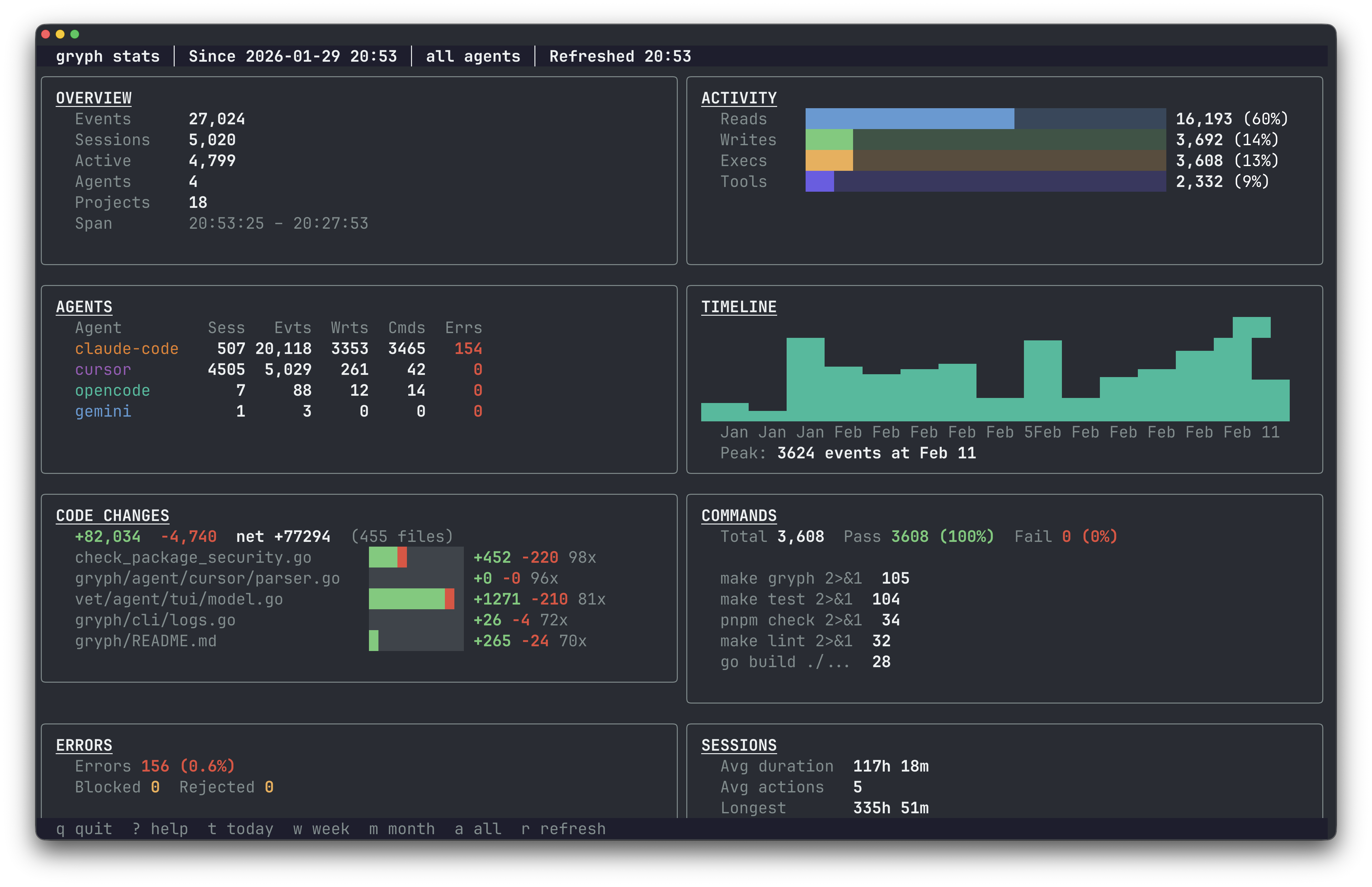
The dashboard surfaces which agents are most active, what types of actions dominate, and how file access distributes over time. Useful for both individual developers tracking their own agent usage and security teams reviewing patterns across a team.
Engineering discipline, not distrust
The argument for AI agent audit trails is the same argument we made for structured logging in production services a decade ago. It is not about distrust. It is about maintaining the same engineering discipline we apply everywhere else.
Production systems are observable because we learned the hard way that you cannot debug, secure, or improve what you cannot see. AI agents are reaching comparable levels of access and autonomy, executing multi-step tasks, running commands, modifying files across repositories. The audit trail becomes more important as capabilities grow, not less.
Local-first is the right default for this. Sending every file read and command execution to a cloud service creates exactly the kind of data exposure you are trying to audit against. The audit trail should live on the developer’s machine, queryable locally, exportable when needed. Gryph supports JSONL export for feeding events into centralized systems like OpenSearch or Splunk when the use case calls for it.
Try it
Gryph is open source under Apache 2.0.
# Homebrewbrew install safedep/tap/gryph
# npmnpm install -g @safedep/gryph
# Shell scriptcurl -fsSL https://raw.githubusercontent.com/safedep/gryph/main/install.sh | shInstall hooks, use your agents, query the trail. The GitHub repo has full documentation: github.com/safedep/gryph.
- ai-agent-security
- open-source
- developer-tools
- claude-code
Author

Abhisek Datta
safedep.io
Share
The Latest from SafeDep blogs
Follow for the latest updates and insights on open source security & engineering

ASOS App Hack: Attackers Used Push Notifications to Send a Ransom Note
Attackers got into the platforms ASOS uses to message customers and pushed an extortion note to phones. Here is what is confirmed, what is only claimed, and what customers should do.

42 Malicious RubyGems Open a Reverse Shell at Install Time
One RubyGems account published 42 gems that run code during gem install. On a developer workstation, the gems open a reverse shell or download a second stage. They do nothing on CI runners and...

tensorlake 0.5.144 npm Compromise Ships Mini Shai-Hulud
[email protected] on npm ran a Mini Shai-Hulud worm at install. A maintainer account committed the payload through the GitHub web interface, and the official release workflow published it.
An Attacker Hijacked an AI Coding Assistant to Spread a Worm
An attacker took over a live AI coding assistant session, got it to recommend a poisoned package, and used the stolen tokens to spread the Shai-Hulud worm across about 100 internal repositories.


Ship Code.
Not Malware.
Start free with open source tools on your machine. Scale to a unified platform for your organization.
