



On this page
TL;DR
We just shipped Shadow AI discovery capability in vet. Here is why you should care:
- AI tools (agents, MCP servers, extensions) and AI SDKs (OpenAI, LangChain, Anthropic) are spreading across developer environments with zero inventory
- vet is extended to support Shadow AI discovery, both in endpoints and source code
vet ai discoverscans developer machines for coding agents, MCP servers, IDE extensions, and project configsvet code scandetects AI SDK usage in Go, Python, and JavaScript/TypeScript source code- Findings integrate into CycloneDX SBOMs for compliance workflows
- Open source, local first, no sign-up:
brew install safedep/tap/vet
Eliminate Shadow AI in developer endpoints and application code using free and open source tools that integrates in your existing security architecture.
Shadow AI
Shadow AI has two surfaces that most security teams are blind to.
The obvious one: AI coding agents, MCP servers, and IDE extensions installed on developer machines. Claude Code, Cursor, Windsurf, Copilot, a handful of MCP servers connecting those agents to internal services. Most teams do not have an inventory.
The less obvious one are AI SDKs quietly added as dependencies in
application code. A developer adds openai to a service’s requirements.txt. It ships through CI.
No scanner flags it. Three sprints later, nobody remembers it’s there.
SafeDep’s open source CLI vet covers both surfaces. vet ai discover inventories AI tools across developer environments. vet code scan detects AI SDK usage
in source code. Same CLI, two commands.
Security audit: what AI tools are running across the team?
A security team drafting an AI acceptable use policy needs to start with a basic question: what are developers actually using?
vet ai discovervet discovers supported AI agents, MCP servers and other related configurations by scanning
well-known locations. New agents, tools and config can be easily added. Create an issue to request a new AI tool
which is currently not supported for discovery.
█░█ █▀▀ ▀█▀ From SafeDep▀▄▀ ██▄ ░█░ version: 1.14.0 commit: 5f9528
Discovered 10 AI tool usage(s) across 4 app(s)
┌────────────────┬─────────────────────────┬─────────────┬─────────┬─────────┐│ TYPE │ NAME │ APP │ SCOPE │ DETAIL │├────────────────┼─────────────────────────┼─────────────┼─────────┼─────────┤│ Coding Agent │ Claude Code │ Claude Code │ System │ ... ││ Project Config │ Claude Code │ Claude Code │ Project │ ... ││ MCP Server │ pinner-mcp-stdio-server │ Cursor │ System │ ... ││ MCP Server │ safedep │ Cursor │ System │ ... ││ Coding Agent │ Cursor │ Cursor │ System │ ... ││ Coding Agent │ Windsurf │ Windsurf │ System │ ... ││ CLI Tool │ Claude Code │ Claude Code │ System │ ... ││ CLI Tool │ Cursor │ Cursor │ System │ ... ││ AI Extension │ GitHub Copilot Chat │ VS Code │ System │ ... ││ AI Extension │ GitHub Copilot │ VS Code │ System │ ... │└────────────────┴─────────────────────────┴─────────────┴─────────┴─────────┘The inventory distinguishes system level components from project level configurations.
Console output for quick review, or --report-json for ingestion into an external system.
MCP server risk: what’s connected, and where?
MCP servers are the emerging risk vector in this list. They can access credentials, execute code, and interact with external services on behalf of coding agents. The infamous malicious postmark-mcp incidents highlights the practical impact of this attack surface.
The vet ai discover output already classifies MCP servers separately. To extract just the MCP server entries:
vet ai discover --report-json inventory.json --silent && \ cat inventory.json | jq '.tools[] | select(.type == "mcp_server")'{ "id": "5fba543f9bf355e8", "source_id": "fddf1e76e68a529", "name": "pinner-mcp-stdio-server", "type": "mcp_server", "scope": "system", "app": "cursor", "config_path": "/Users/dev/.cursor/mcp.json", "mcp_server": { "transport": "stdio", "command": "docker", "args": ["run", "--rm", "-i", "ghcr.io/safedep/pinner-mcp:latest"] }}Project scoped MCP servers deserve extra attention. A .mcp.json in a repository means every developer who clones that repo inherits those server configurations.
If one is compromised, the blast radius is the entire team working on that repo. The JSON output includes enough metadata to classify each server by risk profile.
See the AI Tools Discovery guide for the full command reference and scope definitions.
Compliance: machine-readable inventory for governance
When the org formalizes AI governance, whether internal policy, EU AI Act prep, or a CISO asking “what AI tools do we use?”, the answer needs to be structured and repeatable.
# Per-repo scanvet ai discover --scope project -D ./my-service
# Machine-wide inventory to filevet ai discover --report-json ai-inventory.jsonThe JSON output is stable enough to build automation on. Diff inventories across sprints. Alert on new MCP servers appearing in project configs. Compare discovered tools against an approved list for gap analysis.
AI SDKs in code: the second surface
The use cases above cover what’s installed and configured on developer machines. But shadow AI has a second surface: AI SDKs embedded in application code.
A developer adds langchain or the openai SDK as a dependency. It passes code review because it’s just another package.
Not many tools flag it as an AI integration. vet handles this through its code scanning capability.
# Build code analysis databasevet code scan --db code.db --app ./src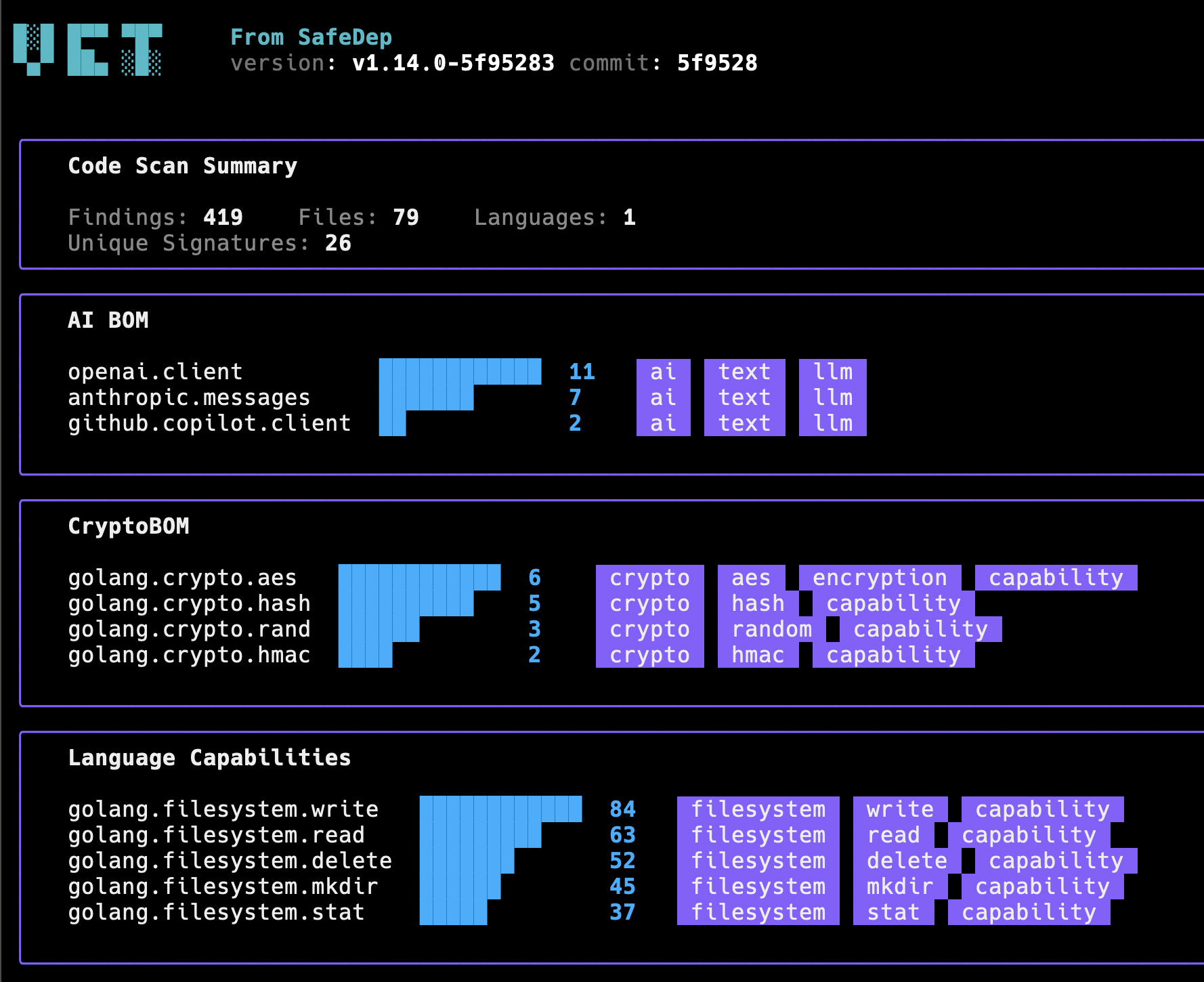
# Query for AI SDK usagevet code query --db code.db --tag ai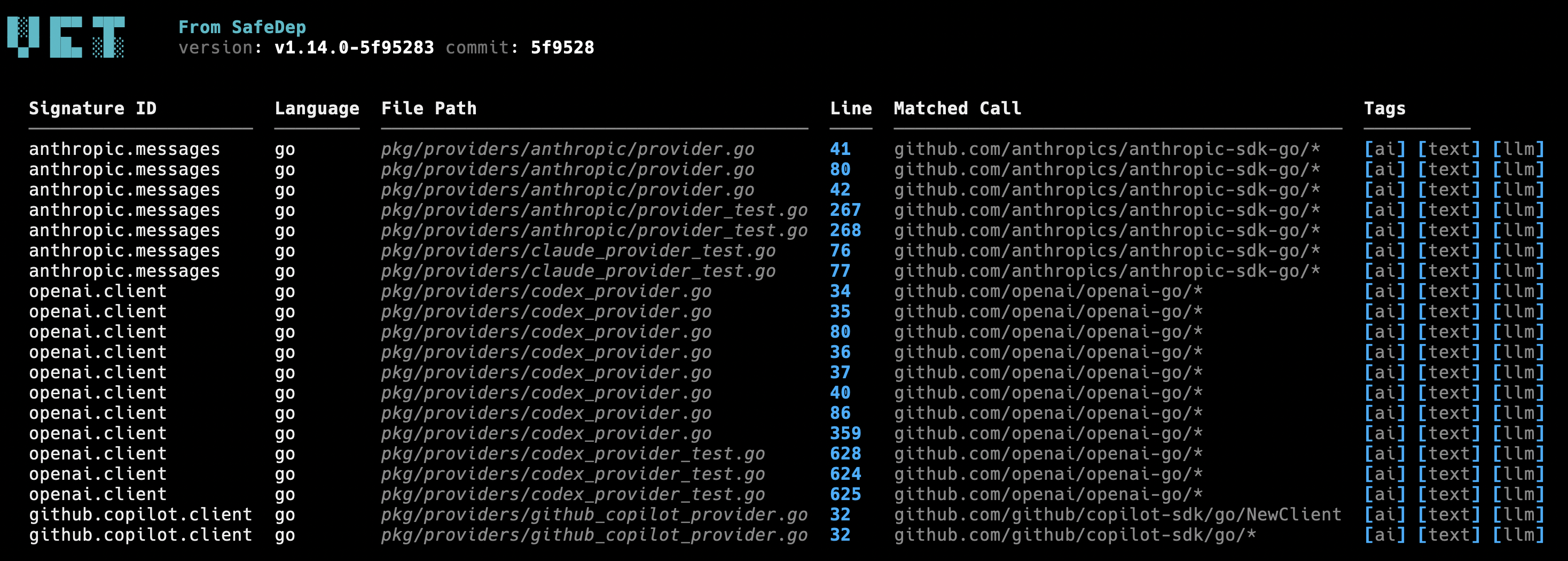
The code scan detects OpenAI, Anthropic, LangChain, and other popular AI SDKs used in code across Go, Python, and JavaScript/TypeScript. Detection uses community maintained signatures matched against call patterns in source code. The signatures are described as simple YAML documents and can be extended to cover more AI SDKs easily.
The findings integrate into existing SBOM workflow producing a CycloneDX SBOM enriched with AI usage evidence.
vet scan -D ./src --code code.db --report-cdx sbom.jsonAI tool inventory now becomes part of the same compliance artifact as dependency inventory. See the Shadow AI Detection guide for supported SDKs, detection signatures, and SBOM output format.
Discovery is step one
AI governance starts with visibility. vet ai discover covers the environment: agents, MCP servers,
extensions, project configs. vet code scan covers the code: AI SDK imports and API calls.
Together, they produce a complete inventory of your AI footprint. JSON and CycloneDX output for
automation. Console tables for quick review.
vet is open source and runs locally. No sign-up, no API keys required for local discovery.
brew install safedep/tap/vetBeyond discovery, vet also handles dependency scanning, malware detection, and policy enforcement from the same CLI.
Conclusion
Shadow AI is not a future risk. It is the current state of most engineering organizations. AI tools are installed on developer machines without centralized tracking. AI SDKs are added to codebases without security review. The result is an expanding attack surface that traditional asset inventories and dependency scanners miss entirely.
vet closes that gap. Two commands, two surfaces, one CLI. Run vet ai discover to inventory every agent, MCP server, and extension across your team’s machines. Run vet code scan to find every AI SDK call buried in your application code. The output is structured, diff friendly, and fits into the compliance workflows you already have.
Start with discovery. Governance follows from there.
- shadow-ai
- mcp
- ai-agent-security
- code-analysis
- vet
Author

SafeDep Team
safedep.io
Share
The Latest from SafeDep blogs
Follow for the latest updates and insights on open source security & engineering

The Agentic IDE Extension Blind Spot
Cursor can install most of the same extensions you had in Visual Studio Code, but not the same versions. Its Import VS Code Configuration step sends only the extension name, never the version. It...
Introducing SafeDep Threat Intel
SafeDep Threat Intel gives SOC and cyber defense teams the malicious package intelligence behind SafeDep's platform, to query or to push into the tools they already run.
Deep-Live-Cam Supply Chain Attack: Technical Analysis
A malicious dependency in Deep-Live-Cam loads a clipboard hijacker. We trace the installation trigger, Telegraph delivery, and Windows and macOS persistence.
A malicious npm package hidden three dependencies deep: the ulid-xyz delivery chain
ulid-xyz is a remote access trojan we reported to OSV as MAL-2026-6672. It reached developers as a third-level transitive dependency of ioredis-xyz, a copy of the real Redis client planted in 28...


Ship Code.
Not Malware.
Start free with open source tools on your machine. Scale to a unified platform for your organization.
