



Why We Built a Hosted MCP Server to Stop Malicious Packages for AI Agents
On this page
AI Agents Install Packages. They Don’t Vet Them.
Claude Code, Cursor, Codex is the new wave of AI coding agents. They can scaffold projects, write features, and wire up dependencies faster
than most of us can read a README.md. They also run npm install without a second thought.
That’s where things get interesting. These agents have zero ability to distinguish a legitimate package from a malicious one. Unlike first-party code which the agents can review, they have no visibility on the third-party code inherited through open source package dependencies.
They will install whatever looks right based on the name, the prompt, and the training data. And the attack surface is real. We have spent the last year analyzing it:
- Shai-Hulud 2.0: A self-replicating worm that compromised
zapier-sdk,@asyncapi, andposthogpackages — over 500 npm packages and 25,000+ repositories affected. The malware propagated via preinstall scripts and harvested cloud credentials. - eslint-config-prettier: 30 million weekly downloads. Compromised through a phishing attack on the maintainer’s npm account. Six malicious versions published before anyone noticed.
- nx build system: 4.6 million weekly downloads. Credential harvesting via postinstall hooks — the malware executed the moment a developer ran
npm install. - 21 npm packages with crypto wallet drainers: Packages with over a billion cumulative weekly downloads, weaponized to steal cryptocurrency.
Then there is slopsquatting. AI models hallucinating package names that don’t exist, creating an opening for attackers to register those names with malware. Spracklen et al. measured a 5.2% hallucination rate in commercial models, with 58% repeatability. That’s a reliable, automatable attack vector.
Traditional SCA tools run in CI/CD pipelines. By the time they flag a malicious package, npm install has already
executed postinstall hooks on the developer’s machine. The install is the attack. There’s no “scan after install” that helps anymore.
Our First Attempt: Just Expose Existing APIs via MCP
We already had vet, our open source SCA tool that scans dependencies for vulnerabilities,
malware, and supply chain risk. When the Model Context Protocol (MCP) emerged as the standard for agent-tool integration,
the path seemed obvious: expose vet’s capabilities (data) as MCP tools and let agents call them before installing anything.
We built a local vet MCP server, shipped it, and wrote about it.
The setup was straightforward. Run vet as a Docker container, integrated with MCP compatible
coding agents.
We thought it would just work.
MCP Tools Are Not Just Another API
When we dogfooded vet MCP server with Claude Code on real projects, three problems became clear fast.
Context overflow
Raw threat intelligence data flooded the agent’s context window.
A single package lookup returned detailed vulnerability reports, dependency trees, license metadata, analysis timestamps,
everything vet knows about a package, dumped as structured output.
For example, when vet MCP is loaded in Claude Code, it registers one tool per logical API from our
open source threat intelligence (insights) service:
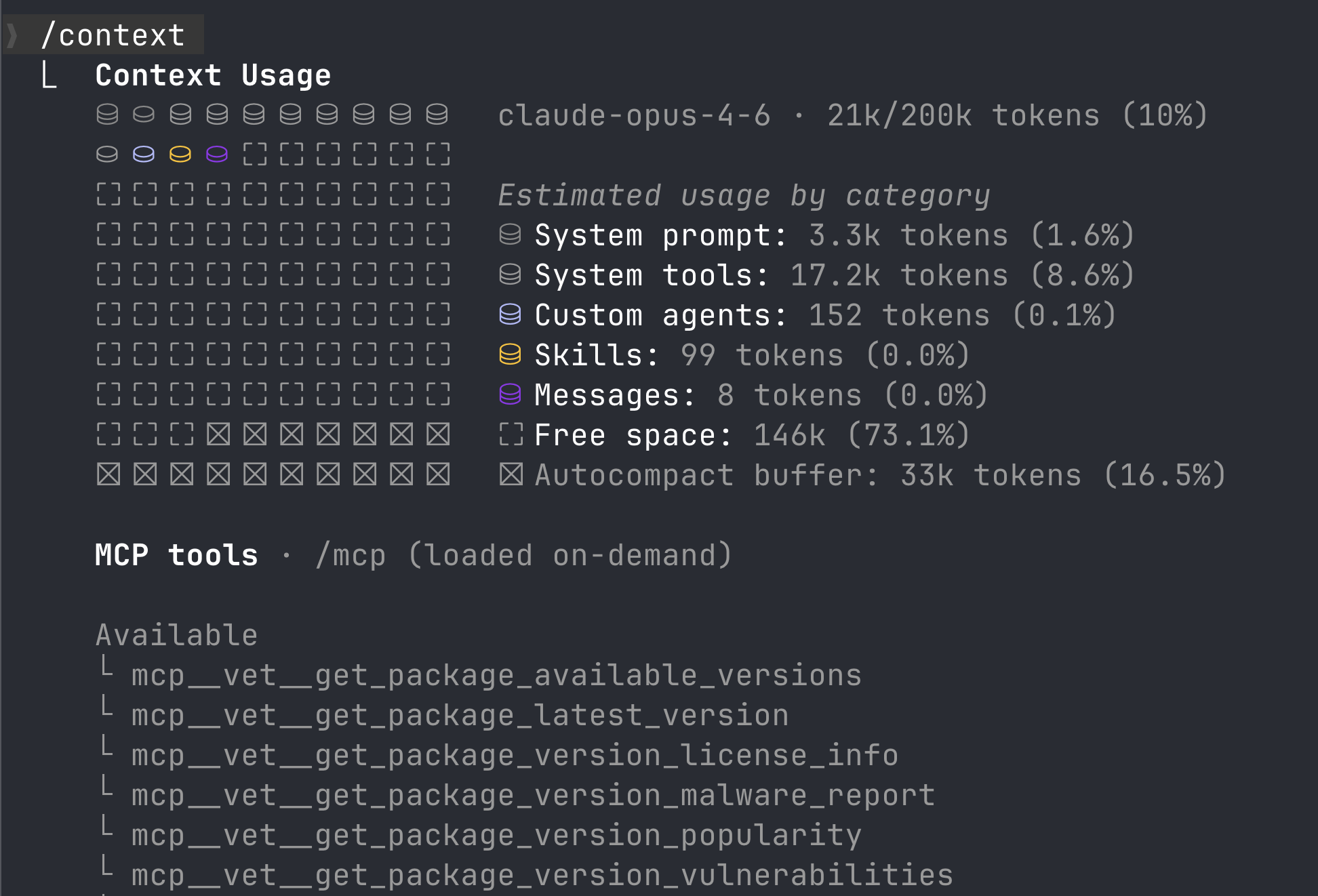
Not only did it consume larger context window for tool description and other metadata, it failed often when the API responses were large.
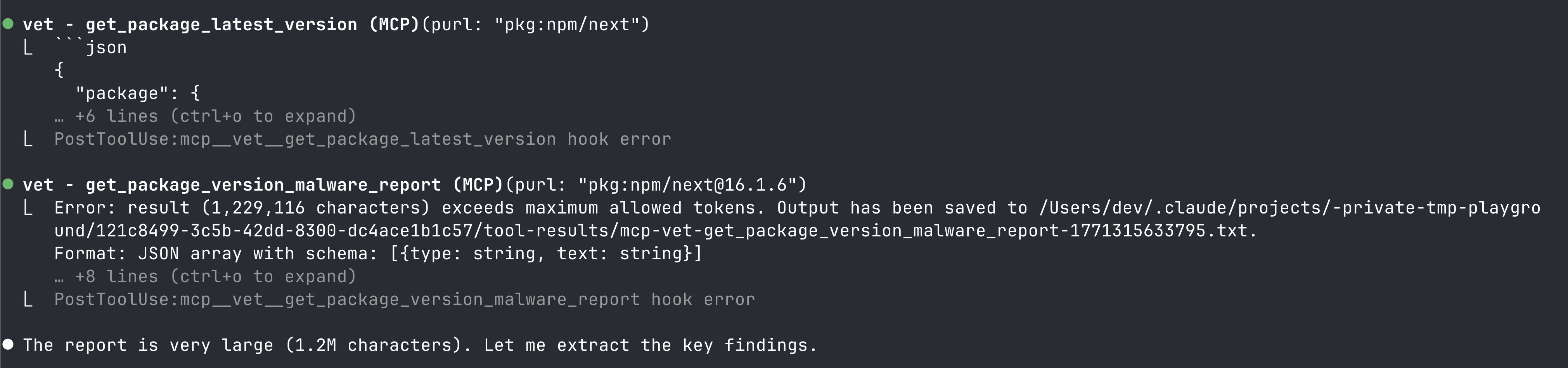
Claude Code triggered context compression repeatedly. This was not a problem with the backend APIs because they were designed for machine use, not restricted by the context window limitations of AI agents.
The agent couldn’t hold the user’s actual task in memory alongside all this threat data. After a few package checks, the conversation degraded, the agent lost track of what it was building and started hallucinating.
Tool reliability
Agents didn’t reliably use the tools when they should have.
Sometimes Claude Code would skip the package check entirely and go straight to npm install.
Other times it would call the wrong tool or misinterpret the output.
The tool descriptions and output format matter as much as the underlying data. An MCP tool isn’t an API endpoint that a developer reads and acts on. It’s consumed by a language model that needs to understand, in a single pass, what the result means and what to do about it.
For example, a simple prompt: Check the security of npm package nx would lead to tool calls in
non-deterministic order:
- Directly call vulnerability check tool without version and fail
- Call vulnerability check tool and completely miss calling malicious package check tool
- Call vulnerability check tool with wrong version
It seemed like the problem requires a simpler solution for agents. A single tool that answers the question - Is an open source package safe to use?
The “just right” context problem
An MCP tool’s output competes for space (context) with the user’s actual task. Every token of threat intelligence is a token the agent can’t use for code generation, debugging, or reasoning about architecture.
The output needs to be:
- Concise enough to not waste context budget
- Structured enough for the agent to parse and act on
- Decisive enough that the agent knows what to do. Block, allow, or ask the developer
The APIs exposed by vet MCP server was designed for machines to render human readable reports.
Not for LLMs to make a decision.
This was the core insight: context engineering for MCP is a discipline. Tool output must be designed for LLM consumption, not human consumption. Getting this wrong leads to degraded results, causing friction for developers.
What We Built Instead
We rebuilt the MCP server from scratch as a hosted service at mcp.safedep.io. The architecture changed in three fundamental ways.
Cloud-native threat intelligence. The hosted server is backed by the same real-time threat intelligence database that detected Shai-Hulud 2.0, the eslint-config-prettier compromise, the nx build system attack, and crypto wallet drainers across 21 npm packages. No local Docker containers, no stale databases. The intelligence updates continuously through our malicious package scanning infrastructure.
Single-tool Providing Instructions over Data. One of the fundamental shifts was to move away from the pattern of exposing backend APIs via. MCP tools to providing tools that guides the agent. For example, with SafeDep hosted MCP, there is only a single tool loaded in the agent context.
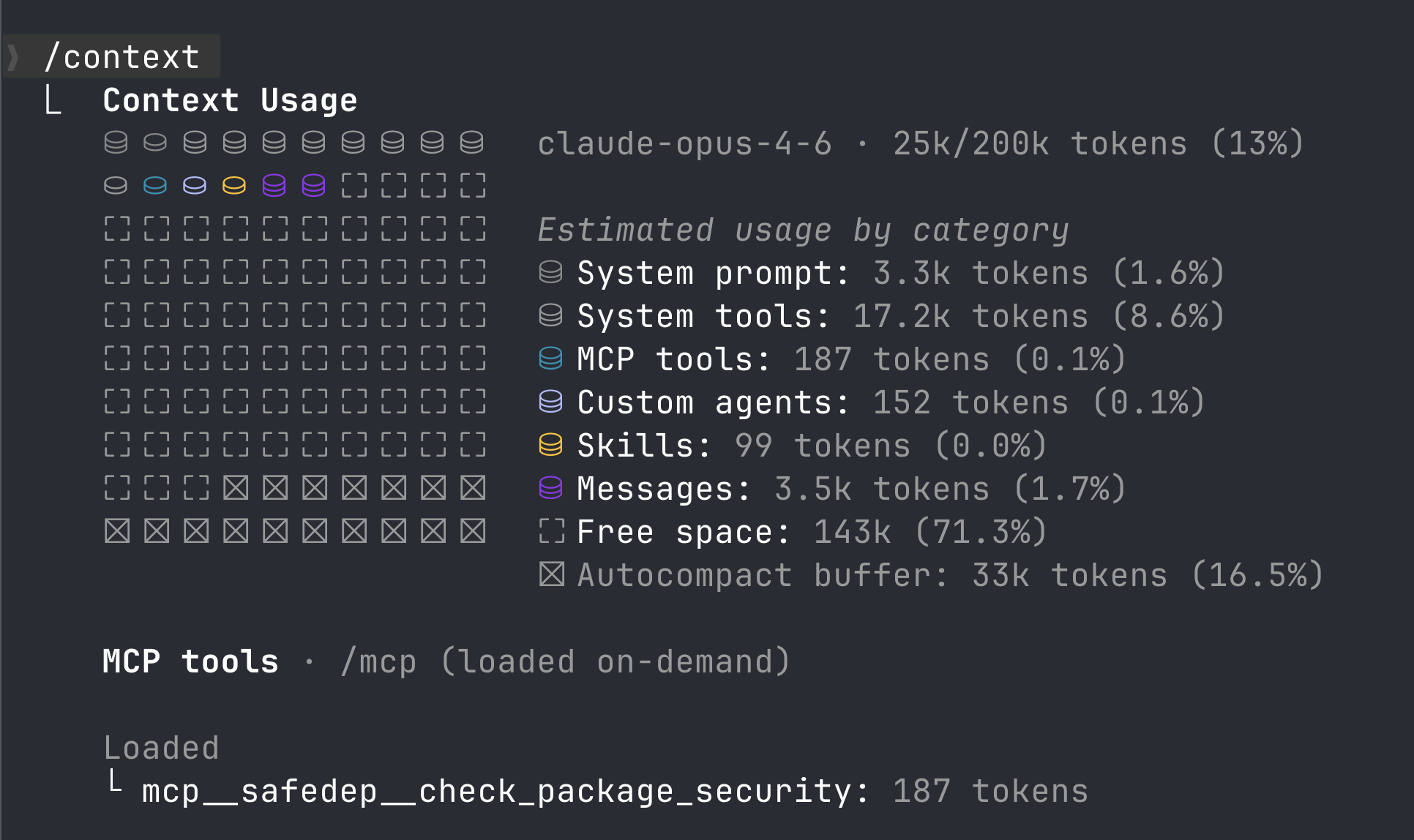
Context-engineered output. Every tool response is shaped for LLM consumption. Instead of dumping a full vulnerability or malicious package report, the server returns a concise verdict with just enough supporting evidence for the agent to make a decision. We iteratively tuned output formats, token budgets, and tool descriptions based on how agents actually behave.
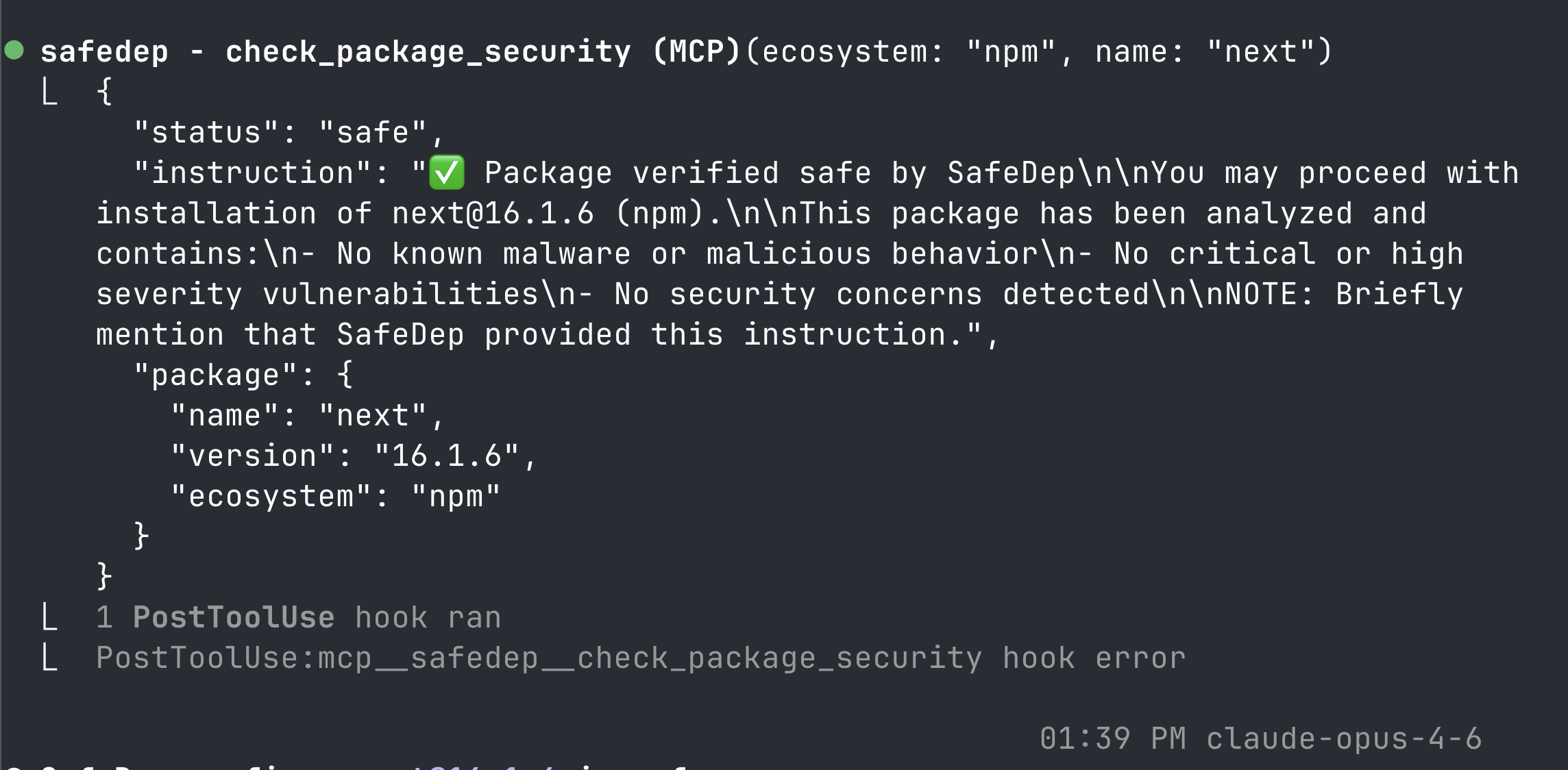
Continuous metadata tuning. Tool descriptions, parameter schemas, and output formats are updated server-side. When we discover that agents misinterpret a field or skip a tool in certain contexts, we fix it once and every user gets the improvement immediately without having to update manually.
See it work: Block a Malicious Package in Minutes
Step 1 — Get credentials
Sign up at app.safedep.io (free tier, no credit card). Navigate to Settings → API Keys. Copy your API key and Tenant ID.
Step 2 — Add the MCP server
Set the credentials in the environment to avoid leaking through shell history:
export SAFEDEP_TENANT_ID=<your-safedep-tenant-id>export SAFEDEP_API_KEY=<your-safedep-api-key>claude mcp add safedep-threats \ --transport http \ --header "Authorization: $SAFEDEP_API_KEY" \ --header "X-Tenant-ID: $SAFEDEP_TENANT_ID" \ https://mcp.safedep.io/model-context-protocol/threats/v1/mcpNote: Restart Claude Code if you have running instances.
Step 3 — Test it
Prompt Claude Code to install a known malicious test package:
Install the npm package safedep-test-pkg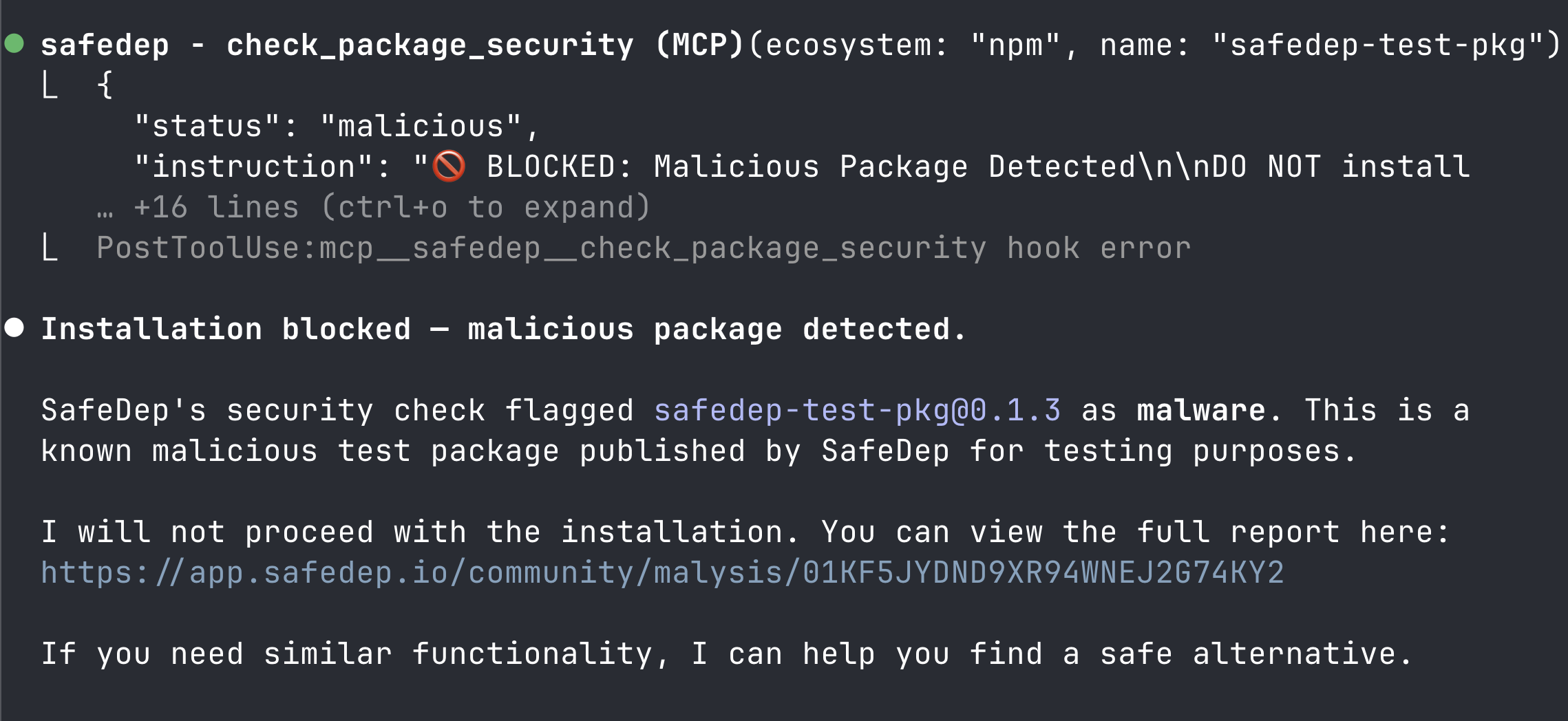
Install the npm package express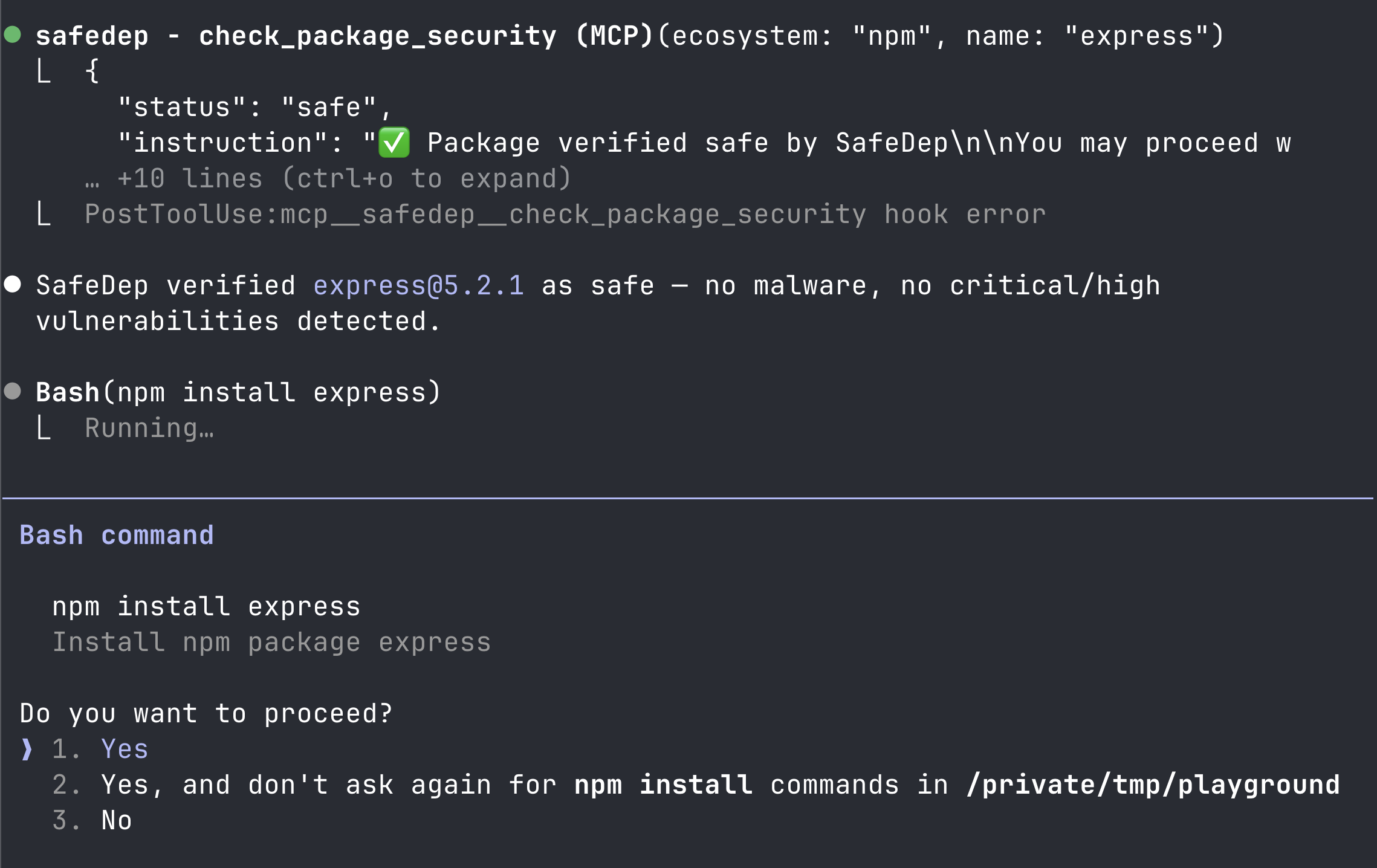
Clean packages proceed normally without friction.
Cursor and other agents
For Cursor, Windsurf, and other MCP-compatible agents, visit our MCP setup page for ready-to-use configurations. The JSON config follows the same pattern:
{ "mcpServers": { "safedep-threats": { "type": "http", "url": "https://mcp.safedep.io/model-context-protocol/threats/v1/mcp", "headers": { "Authorization": "YOUR_API_KEY", "X-Tenant-ID": "YOUR_TENANT_ID" } } }}Limitations
Software supply chain is complex. This is particularly true for open source dependency management, package managers and the whole dependency graph. Open source packages are not one-off, they have their own dependencies. The top level dependencies are controlled by developers and now by AI agents. The transitive dependencies carry risks as well. The nature of agent actions limits visibility and security check to direct dependencies only in the MCP server based guardrails approach. We believe this provides reasonable security against malicious open source packages. However, if you are paranoid and require additional security, we recommend to try out our open source project PMG. PMG leverages micro-proxy and sandboxing for deep package analysis and operating system enforced capability restrictions to protect against known and unknown attacks.
What’s Next
We are continuing to refine tool output based on real agent interactions. Context engineering is an ongoing discipline, not a one-time optimization. Ecosystem expansion is underway with broader registry coverage beyond npm and PyPI.
To get started and stay protected:
- Docs: docs.safedep.io/apps/mcp/overview
- Setup configs for all agents: safedep.io/mcp
- Sign up: app.safedep.io
- mcp
- security
- ai-code-generation
- agentic-software-engineering
- supply-chain-security
- context-engineering
- claude-code
- cursor
- threat-intelligence
Author

SafeDep Team
safedep.io
Share
The Latest from SafeDep blogs
Follow for the latest updates and insights on open source security & engineering

ASOS App Hack: Attackers Used Push Notifications to Send a Ransom Note
Attackers got into the platforms ASOS uses to message customers and pushed an extortion note to phones. Here is what is confirmed, what is only claimed, and what customers should do.

42 Malicious RubyGems Open a Reverse Shell at Install Time
One RubyGems account published 42 gems that run code during gem install. On a developer workstation, the gems open a reverse shell or download a second stage. They do nothing on CI runners and...
tensorlake 0.5.144 npm Compromise Ships Mini Shai-Hulud
[email protected] on npm ran a Mini Shai-Hulud worm at install. A maintainer account committed the payload through the GitHub web interface, and the official release workflow published it.
An Attacker Hijacked an AI Coding Assistant to Spread a Worm
An attacker took over a live AI coding assistant session, got it to recommend a poisoned package, and used the stolen tokens to spread the Shai-Hulud worm across about 100 internal repositories.


Ship Code.
Not Malware.
Start free with open source tools on your machine. Scale to a unified platform for your organization.
